Live Wallpaper
What is Live Wallpaper?
iOS allows users to set Live Photos as lock screen wallpapers. When the screen lights up, the Live lock screen wallpaper animates - this is iOS Live Wallpaper.
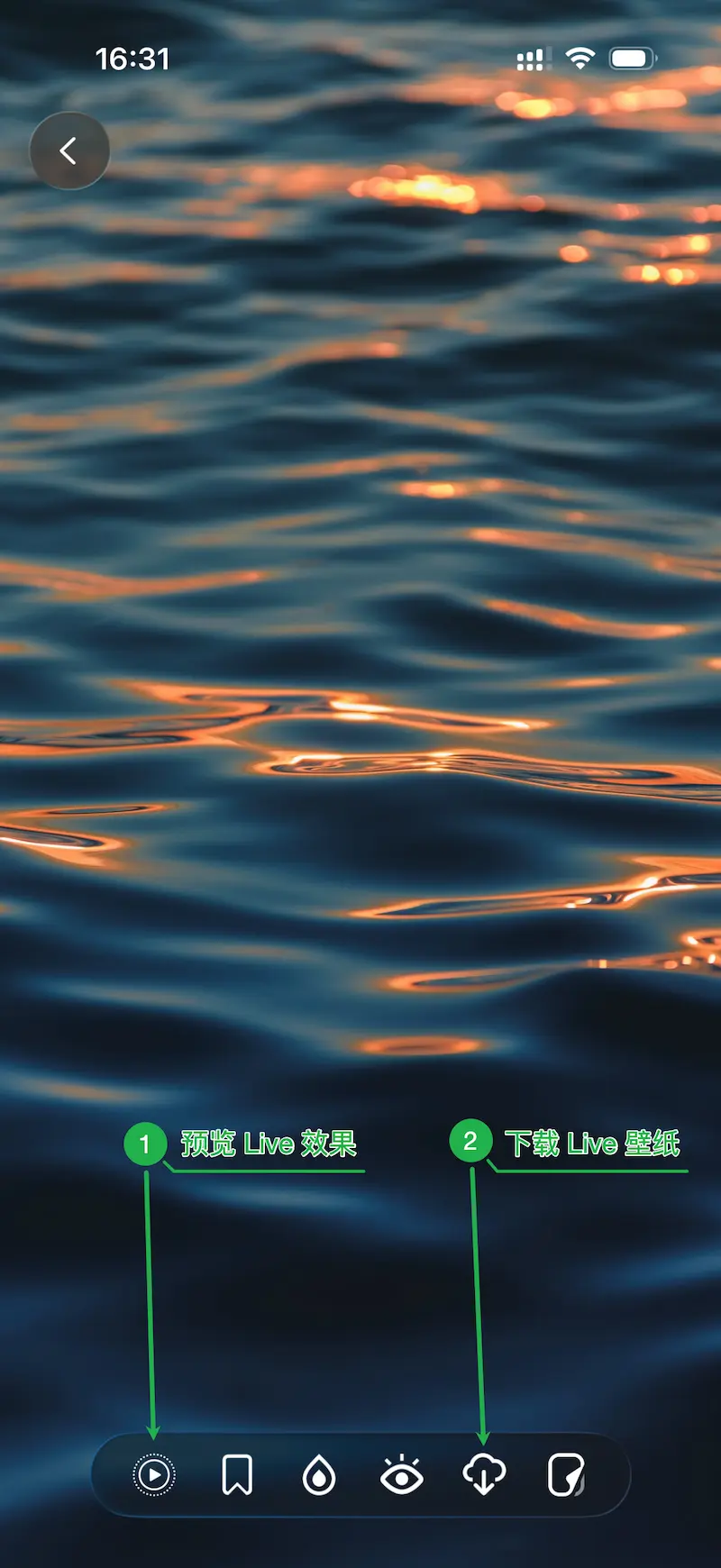
You can find and download Live Wallpapers in Cuto iOS 3.1 and later versions through the “Live Wallpaper” collection, or by looking for the Live icon in the top-left corner of wallpaper thumbnails in the app.
How to set Live Wallpaper? Can it be set automatically via Shortcuts?
You need to manually download the Live Wallpaper in Cuto to your system photo library, then manually set it as your lock screen wallpaper from “Settings - Wallpaper”, and tap the Live icon on the settings page to activate the dynamic effect.
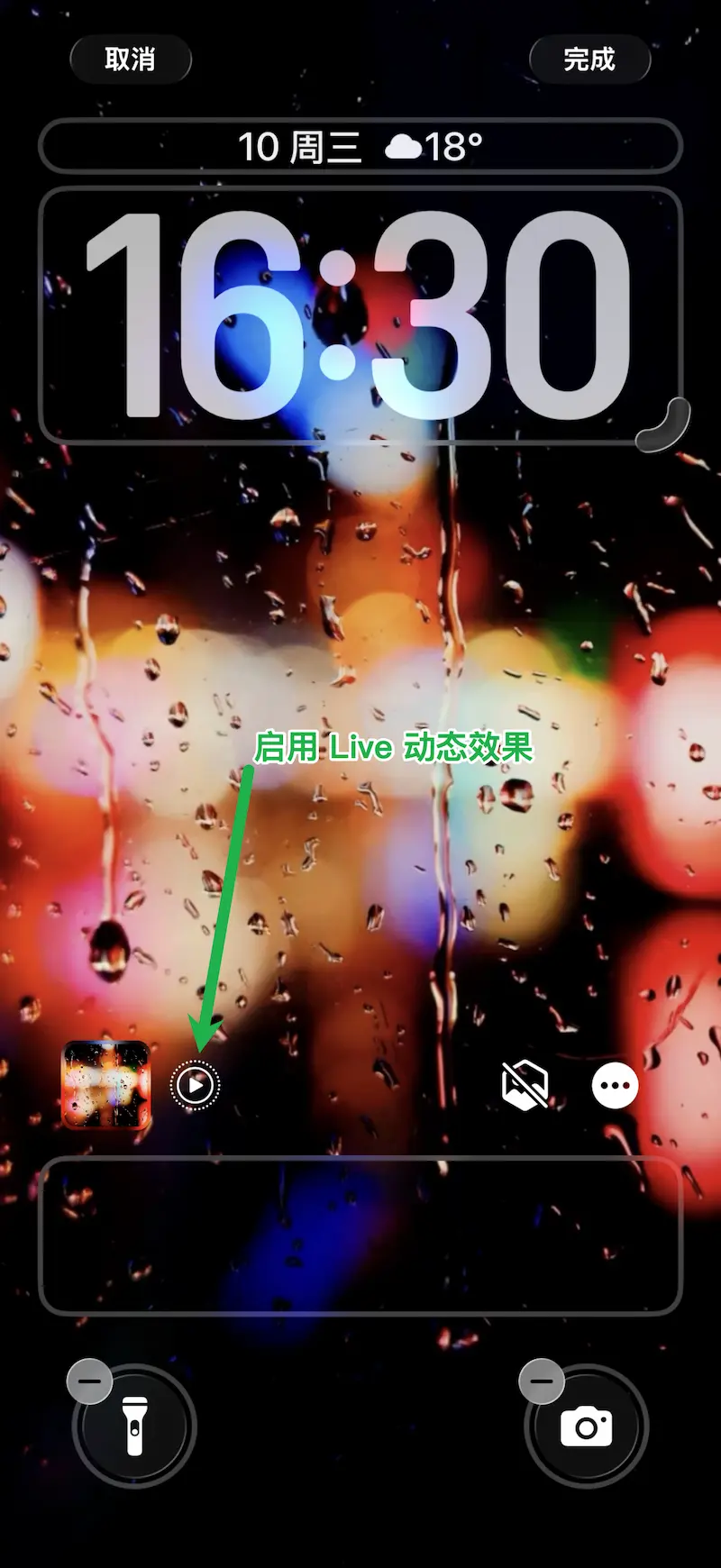
Currently, iOS does not provide API access for setting Live Wallpapers, so third-party apps cannot automatically set Live Wallpapers.
Why does the Live Wallpaper only animate once on the lock screen and not loop?
This is an Apple iOS system design. All Live Photos set as lock screen wallpapers will only animate once when the screen lights up and cannot loop.
Why do some Live Wallpapers have minimal movement?
Unfortunately, iOS system’s post-processing is completely a “black box” and intelligently processes based on wallpaper content, making the final Live lock screen effect uncontrollable.
We’ve also reviewed similar Live Wallpaper apps on the market, and currently, there’s no perfect solution. If you have ideas to improve Live Wallpaper effects, please let us know. We’ll continue exploring better dynamic effects.
What makes Cuto Live Wallpapers different from others?
Many Live Wallpapers found online, or Live Photos we take ourselves, cannot enable the Live effect in the system settings interface when set as Live Wallpapers - meaning originally dynamic images won’t animate as Live Wallpapers. All Live Wallpapers provided by Cuto won’t have this issue.
Every Cuto Live Wallpaper is manually selected by Cuto editors and fine-tuned on actual devices, first ensuring they definitely animate, and second, trying to ensure the final dynamic effect is appropriate and beautiful.
However, due to iOS system’s “black box” post-processing, we don’t have a good way to fully guarantee every wallpaper’s final dynamic effect is good enough. Please understand.
If you have ideas to improve Live Wallpaper effects, please let us know. We’ll continue exploring better dynamic effects.
Why does the Live Wallpaper preview in Cuto look very different from when set as the system lock screen?
iOS automatically processes Live Wallpapers when users set them, controlling the duration, movement range, and speed of Live Wallpapers, which causes the lock screen effect to differ.
For example, when you preview in the Cuto app or view Live Wallpapers saved to your photo library, you’ll notice they move very fast. This is because when you set it as a lock screen, iOS significantly slows down the speed - only by speeding up the original Live Wallpaper can the final effect be better.
The Live Wallpaper is a bit blurry, can you improve the quality?
Through our testing, iOS currently has strict size/resolution limits for Live Wallpapers. Exceeding these limits will prevent the dynamic effect from activating when setting the lock screen wallpaper.
This is similar to iOS 26 spatial wallpapers - if you set a spatial wallpaper, the image quality will be somewhat lower and blurrier. This issue can only be resolved by Apple’s future iOS optimizations.
I’m a Cuto Pro user, why can’t I download Live Wallpapers?
Cuto Live Wallpapers are new content benefits introduced in Cuto iOS 3.1, available to all Cuto Plus subscription members (including Plus trial users).
Cuto Pro is a one-time purchase (non-subscription) introduced in 2021. For Cuto’s long-term healthy operation, we launched Cuto Plus subscription membership in September 2025 to replace Cuto Pro one-time purchase.
At the same time, we cherish and appreciate every user who purchased Pro. Therefore, all existing Cuto Pro users still permanently enjoy the unlocked content and feature benefits without needing to re-subscribe, only needing to subscribe to Plus when wanting to use new content and features introduced after Cuto 3.0. (Pro users can enjoy significant discounts on their first year of Plus subscription)
Therefore, “Live Wallpapers” introduced in version 3.1 are new content after 3.0 and require a Cuto Plus subscription to download.
Will Live Wallpapers be updated in the future?
Yes. We plan to update 2-3 wallpapers irregularly each week, but due to the uncontrollable nature of iOS Live Wallpaper effects and Cuto’s strict quality requirements, the update volume won’t be very high, but we’ll maintain long-term continuous updates.
Can you support custom Live Wallpapers?
Yes, this is already in our future update plans.
The next version of Cuto iOS will support a “Video to Live Wallpaper” personalized creation feature, allowing users to convert their videos into animating Live Wallpapers that work on lock screens with one click. Stay tuned.
When will Android version support Live Wallpapers?
Cuto Android version will of course also support Live Wallpapers, but it will take some time.
It’s worth mentioning that Live Wallpapers on Android can have higher definition and smoother dynamic effects. Stay tuned.